Dictate into Claude Code
Talk through the change you want and it arrives in Claude Code as a clean prompt, already sent. Most people want the first method; the others suit tmux users and conversations where Claude asks the questions.
Before you start#
- Macrophone on your iPhone and Mac, paired. (Download for Mac)
- Claude Code running in Terminal (or iTerm2, Ghostty or Warp).
- For methods 3 and 4, the command-line tool: in Macrophone for Mac, open the Developer pane and choose Install… next to Command-line tool.
1. Send it to the tab#
Best for: hands-free prompting while you pace, sketch or read another screen.
- In the Mac app, open Profiles. If you don't see Claude Code (Terminal), choose Add a Target… and add it. It goes to Terminal, to the tab running
claude, sends with Return, and answers to the voice prefix “Claude Code”. - Open the profile and, in the row about controlling Terminal, choose Allow…. That lets Macrophone find the tab by the program running in it, even when another tab is selected. (Without it, it matches the tab's title, which Claude Code usually sets to include “Claude”.)
- On your iPhone, start talking with the prefix:
Claude Code, the upload test is flaky. Find out why and fix it.
Or pick Claude Code (Terminal) in Send to by the mic and just talk.
Macrophone brings Terminal forward, selects the tab running Claude Code, shows the prompt with a 2.5-second countdown, types it in and presses Return. Tap Cancel in the panel, or hover over it to pause, if you want to edit first.
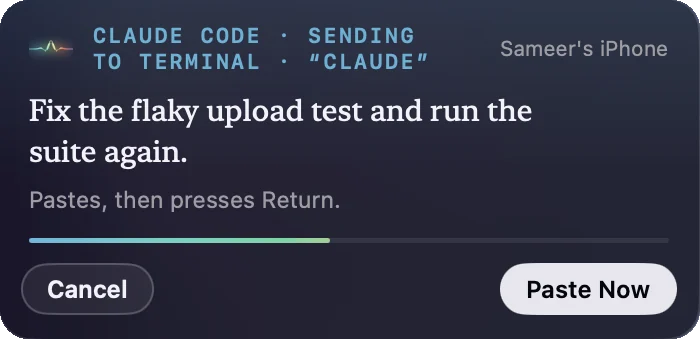
claude.Several Claude Code sessions? Give each its own target with a window field that tells them apart: a folder name in the tab title, or a custom tab title such as “api” or “web”. If nothing matches, nothing is typed; the prompt waits on your clipboard with Try Again.
Optional: in the profile's Shape the text, set Format to Single line so a pause never becomes a line break, and add a template to frame every voice prompt:
{{text}}

Before changing code, restate the task in one sentence and list the files you'll touch.
Using iTerm2, Ghostty or Warp instead? Add that app with Add a Target… and set its window field. iTerm2 matches sessions by name; Ghostty and Warp match window titles. More in window and tab matching.
2. Or a tmux pane#
Best for: Claude Code inside tmux, or a terminal you keep hidden. It types into the pane whatever app is in front.
- Make a profile, say Claude Code (tmux), and under Where it goes choose Type into a tmux pane.
- Pick the pane running
claudefrom the list. - Turn on Press Return after typing, and give it a voice prefix such as “tmux”.
Multi-line prompts go in as one bracketed paste, so a line break never sends half a prompt. See tmux panes.
3. Let Claude wait for you#
Best for: a conversation where Claude asks and you answer out loud.
claude mcp add --scope user macrophone -- macrophone mcpThen ask Claude to listen:
Wait for my next dictation and treat it as the task. Give me up to five minutes.Claude calls wait_for_dictation and carries on the moment you finish speaking. Nothing is typed, so it works whatever window is in front. Use a profile that only copies for this (pick Clipboard in Send to), so the words don't also get typed into the tab. See the MCP docs.
4. Pull it in#
Best for: when you've already dictated something and want it in the conversation.
! mpClaude Code runs the command and adds its output, your latest dictation, to the conversation. Use ! mp --raw for the exact transcript, or ! mp list -n 3 for the last few.
Tips#
- Add your project's words to the dictionary. Library names, commands and acronyms (kubectl, Postgres, TPA) go in Macrophone's dictionary on the phone, so they're heard right and never “corrected” away.
- Talk in the order you'd write. The goal first, then constraints, then how you'll know it worked. Medium cleanup takes care of the rest.
- Put it on a button. Add a Dictate to Mac control set to Claude Code (Terminal) to the Action Button or Control Center, or say “Dictate to Claude Code with Macrophone”. See Shortcuts.
- Away from your desk? If your Mac is asleep, the dictation waits on the phone and arrives later marked delayed. It's only copied then, never typed or sent, so nothing lands in the wrong tab hours later.
- The raw transcript is always there. If cleanup ever changes your meaning, tap Raw on the phone, or use
mp --raw.