Ask Claude
Ask a question out loud and read Claude’s answer on your Mac a moment later, without opening a chat. It uses your own Anthropic API key.
This sends text to Anthropic. Ask Claude is the one action that sends your dictation to a model provider: the final text, and any instructions you wrote, go to Anthropic’s API with your key, under your agreement with Anthropic. The editor labels it Sends text to Anthropic, and the profile list shows Sends text off this Mac. Audio is never sent; Macrophone doesn’t keep any.
What it sends#
The final text (after snippets, format and template), as one message to Claude, with the profile's Instructions as the system prompt if you wrote any. Nothing else: no history, no other dictations. The dictation itself is still delivered wherever the profile sends it.
Want to type into the Claude app instead, and keep the conversation there? Use app targeting; no API key needed.
Add your API key#
- Create a key in the Anthropic Console. API usage is billed by Anthropic to your account.
- In Macrophone for Mac, open Developer › Claude API key, paste it (it starts with
sk-ant-) and choose Save. - Test Key checks it by listing models, which costs nothing.
The key is kept in your Mac's login keychain, only ever sent to Anthropic's API, and never written to settings, History or diagnostics. The pane shows it masked. Remove… deletes it.
Set up the action#
In a profile, under Also, choose Add Action › Ask Claude:
| Setting | Choices |
|---|---|
| Model | Claude Sonnet 5.5 (claude-sonnet-5-5, the default: fast and capable), Claude Opus 5.5 (claude-opus-5-5: the most capable, slower and costs more), Claude Haiku 5.5 (claude-haiku-5-5: the quickest and cheapest) |
| Instructions | Optional. A system prompt, such as “Answer in two sentences.” |
| Reply | Copy Claude’s reply to the clipboard (on by default) |
For a profile that only asks Claude, set Where it goes to Nowhere — only do what’s under “Also”, or leave it on the clipboard.
Sonnet 5.5 and Opus 5.5 requests opt into Anthropic's server-side fallback, so if a request is declined by a safety classifier, Anthropic's recommended fallback model answers instead of nothing.
Where the reply goes#
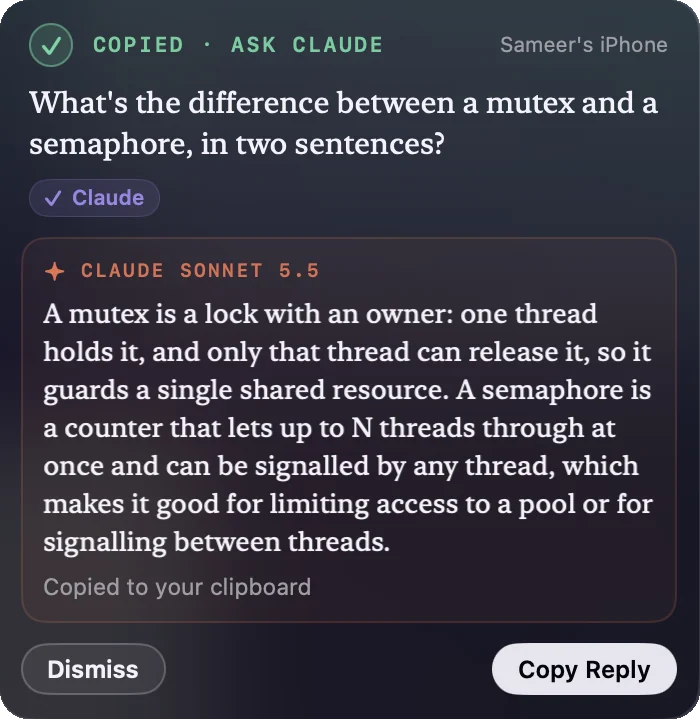
- The panel: the reply streams in as Claude writes it, with Copy Reply and Dismiss. It stays two minutes; hovering holds it.
- The clipboard, when the reply option is on.
- History, next to the dictation.
- The local API, as
replyon the dictation (nulluntil it has finished). Also inmp latest --jsonand the MCP tools' structured content. See getting Claude's reply.
When something goes wrong#
Problems show in the panel, and the dictation is still delivered:
| Problem | What the panel says |
|---|---|
| No key | “Add your Anthropic API key to ask Claude” · Developer › Claude API key |
| The key is wrong or revoked | “Claude didn’t accept your API key” |
| Rate-limited | “Claude is rate-limiting your key” · wait a moment |
| Claude is busy | “Claude is busy right now” · try again in a minute |
| Offline | “Couldn’t reach Claude” |
| Declined | “Claude declined to answer this one” |
| A very long reply | “Claude’s reply hit the length limit” · what arrived is kept |
Ask Again appears where it helps.