Say it on your iPhone.
It goes straight into Claude.
Macrophone turns your iPhone into a wireless microphone for your Mac. Start with “Claude, …” and your words land in the Claude app and are sent, after a moment to cancel. The same goes for ChatGPT, Cursor, or the Terminal tab running Claude Code. Or just put the text on your clipboard. Transcribed on your iPhone. Free, no account.
iPhone with iOS 17 or laterMac with macOS 14 or laterCleanup needs an Apple Intelligence–capable iPhone on iOS 26 or later
Say where it goes. It lands there, and sends.
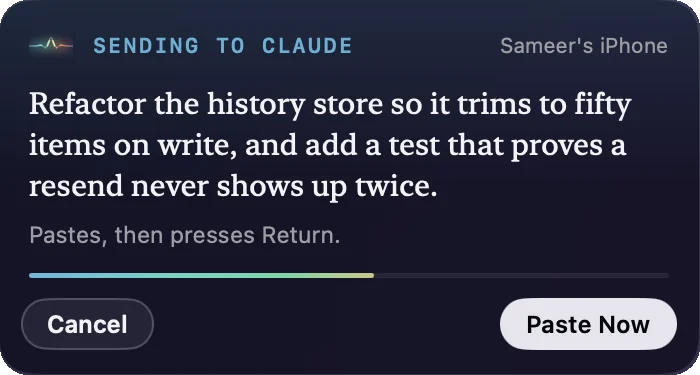
Macrophone for Mac brings the app forward, puts the cursor in the message box, pastes your words, checks they arrived, and presses send. Then it puts your clipboard back. You get 2.5 seconds to cancel first.
Claude Code, the upload test is flaky. Find out why and fix it.
Sent to the Terminal tab running Claude Code, even if you're looking at another tab.- Claude
- Claude Code in Terminal
- ChatGPT
- Codex
- Cursor
- VS Code
- iTerm2
- Ghostty
- Warp
- Slack
- tmux
- any app
Say it
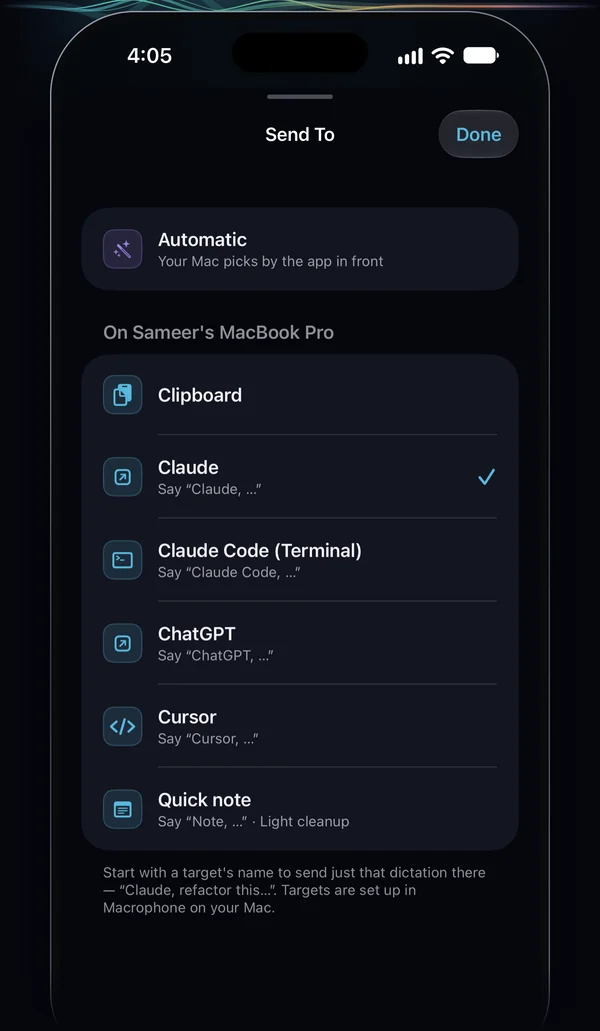
Start with a target's name and a pause: “Claude, …”, “ChatGPT, …”, “Claude Code, …”. Your iPhone takes those words off and sends the rest there, just this once.
Voice prefixesPick it
Tap Send to by the mic and choose a target, or bind one to the Action Button, Control Center or Siri: “Dictate to Claude with Macrophone”.
Shortcuts and controlsOr let it pick
On Automatic, your Mac decides by the app in front. Add rules like “When Cursor is in front, use Cursor”, or let it fall back to your default.
Automatic and rulesSet up once. Then just talk.
Install both apps
The iPhone app from the App Store and the Mac app from this site. Both are free. The Mac app lives in your menu bar.
Pair them
Scan the QR code your Mac shows. There's no account and no IP address to type, and your iPhone remembers the Mac from then on.
Tap the mic and talk
Tap to start and tap to stop, or hold to talk. The text arrives on your Mac a moment later: on the clipboard, or already in Claude and sent.
Made for long prompts.
Prompts keep getting longer, and they're easier to say than to type. Talk through the bug, the plan or the review, and it lands where you work, already cleaned up.
- Claude CodeStraight into the Terminal tab running it, or a tmux pane, and sent. Or let Claude wait for your voice through MCP.
- Chat with AIClaude, ChatGPT, Codex and Cursor's agent: into the message box and sent, with a template around your words if you like.
- Terminals and editorsTerminal, iTerm2, Ghostty, Warp, VS Code, or any app you choose.
- Scripts and agentsA local API, a command-line tool, an MCP server, scripts and webhooks.
And for anyone who writes a lot.
Long Slack messages, email replies, meeting notes and first drafts. Pace the room, think out loud, and the words are waiting on your Mac's clipboard when you sit back down.
The microphone is in your hand, close to your mouth, so it hears you clearly wherever you are in the room, not just in front of the laptop.
Privacy
Speech is transcribed on your iPhone. No audio is kept. No account. Your words go where you send them, and nowhere else.
On-device recognition
Macrophone makes Apple's speech recognizer run on the iPhone itself. Languages that can't be recognized on-device aren't offered.
Your network, encrypted
The phone talks straight to your Mac over the local network, encrypted with a key made when you pair. There's no server in between.
Nothing collected
No account and no analytics in either app. The App Store privacy label reads Data Not Collected. Read the privacy policy.
What you choose to send is labelled. A chat app you send to, like Claude or ChatGPT, handles your words as if you'd typed them. Ask Claude, webhooks and scripts send text off your Mac, and the Mac app marks each one “Sends text off this Mac”. Notes and Reminders sync through iCloud if you use it.
Simple to use. Deep when you want it.
One big button on the phone. Everything else lives in the Mac app, all of it free.
Cleanup edits your words; it never answers them, so a prompt reaches Claude as a prompt. Say “write a function that sorts a list” and that sentence is what arrives. The raw transcript is always one tap away.
- Custom dictionary
- Up to 50 names, tools and acronyms, like kubectl or TPA, so they're heard right and never “corrected” away.
- Targets that send
- Claude, ChatGPT, Codex, Cursor and your terminals: into the message box and sent, with 2.5 seconds to cancel. How it works.
- The right tab
- Name a window or tab (in Terminal, even the program running in it), so “claude” finds Claude Code when another tab is in front.
- Voice prefixes and rules
- “Claude, …” picks a target as you speak; per-app rules pick one by the app in front.
- Templates with context
- Wrap your words with the selection, the window title, the browser's URL, the clipboard or the date. Variables.
- Snippets and formats
- Say “my email”, get the address. Send it as one line, a code block, a quote, or shell- or JSON-quoted.
- tmux panes
- Type into any pane, whatever app is in front, even with the terminal hidden.
- Obsidian, Notes, Reminders
- Log to today's daily note, save a note, or add a reminder with its due date read from what you said.
- Ask Claude
- With your own API key, get Claude's answer in the panel and on your clipboard. Labelled: it sends text to Anthropic.
- Scripts and webhooks
- Run a shell command, or send JSON to Zapier, n8n, Make or Home Assistant.
- Local API, CLI and MCP
- Scripts and agents can pull your latest dictation, and Claude's reply, or wait for the next one.
- Shortcuts and the Action Button
- A control per target (“Dictate to Claude”), Back Tap and Siri, or get the text back in your own shortcut.
- Offline queue
- If the Mac is asleep, the phone holds the dictation and delivers it later, copied but never auto-sent.
- History on both sides
- The last 50 dictations, raw and cleaned, kept only on each device. Clear it or switch it off.
Your voice, as an input for agents.
Sending straight into Claude Code covers most days. For the rest, the Mac app runs a small API on your Mac only, protected by a token and closed to web pages. A command-line tool and an MCP server sit on top, so Claude Code, a script or anything else can read what you just said, or wait for what you say next.
# Give Claude Code a tool that waits for your voice
claude mcp add macrophone -- macrophone mcp

# Or use it from any shell
mp                           # your latest dictation
mp wait | pbcopy             # block until you speak, then copy it
git commit -m "$(mp wait)"   # dictate the commit message
Questions
Is Macrophone free?
Yes. Both apps are free, with no in-app purchases, subscriptions, license keys or account. Every feature on this page is included.
Do my iPhone and Mac need to be on the same Wi-Fi?
It works best when they are. Macrophone can also connect the two devices directly when they're near each other, which helps on office, hotel and guest networks that keep devices apart. Wi-Fi needs to be turned on on both, but neither needs internet access.
What happens if my Mac is asleep or out of range?
Your iPhone keeps the dictation in a queue and delivers it as soon as the Mac is reachable again. Delayed dictations are only copied to the clipboard. They never paste into an app or press Enter on their own, so nothing gets sent to the wrong place hours later.
Is my voice recorded or uploaded anywhere?
No. Speech is transcribed on your iPhone with Apple's on-device recognizer, and cleanup runs on Apple's on-device model. No audio is kept, not even on the phone. The text travels straight to your Mac over your local network, encrypted with a key created when you paired. Text only leaves your devices through something you set up: an app you send it to (a chat app like Claude sends it to its service, as if you'd typed it), Ask Claude, a webhook or a script, which the Mac app labels “Sends text off this Mac”, or Notes and Reminders, which sync through iCloud if you use it. Read the privacy policy.
Which languages does it support?
You can dictate in any language your iPhone can recognize on-device. Cleanup and the custom dictionary's fix-up pass work in English only for now; in other languages you get the raw transcript, which is often all you need.
Which iPhones get cleanup?
Cleanup runs on Apple's on-device model, so it needs an iPhone that supports Apple Intelligence (iPhone 15 Pro, iPhone 15 Pro Max, or any iPhone 16 or later) running iOS 26 or later, with Apple Intelligence turned on. Other iPhones running iOS 17 or later get everything else, with the raw transcript instead of a cleaned one.
Does it work with Claude Code?
Yes. The ready-made Claude Code (Terminal) target finds the Terminal tab running claude and sends your prompt there, even if another tab is in front; start a dictation with “Claude Code, …” to use it. You can also type into a tmux pane, let Claude wait for your voice through the MCP server, or pull your latest dictation in with ! mp. See the recipe.
Does it press Enter for me?
Only when the target is set to send. Claude, ChatGPT, Codex, Cursor and the terminals send by default; VS Code and Slack don't, and any app you add is up to you. Before anything is pasted or sent you get a 2.5-second countdown with Cancel. The send key is only pressed in apps on your Return list, never into a password field, and never for a dictation that waited on the phone while your Mac was away. The safety rules.
Can it send to a specific Terminal tab?
Yes. A Terminal target can name a tab by its title or by the program running in it, so “claude” finds the tab running Claude Code even when you're looking at another one. Matching by program needs you to allow Macrophone to control Terminal (it asks from the profile editor); without that, titles still work. If nothing matches, nothing is pasted: the text waits on your clipboard with Try Again. iTerm2 sessions match by name. Window and tab matching.
Can it type straight into any app?
Yes. Send to a specific app, paste into whatever app you're using, or type into a tmux pane. macOS asks for Accessibility permission the first time. Macrophone never pastes into password fields or while Secure Keyboard Entry is on, and puts your clipboard back afterwards.
Does Automatic need any permissions?
No extra ones. On Automatic, your Mac picks the target by the app that's in front when the dictation arrives, which macOS reports without a permission. Delivering into an app still needs Accessibility, as any paste does. A few template variables ask for their own: {{url}} asks to control your browser, and {{selection}} and {{window}} use Accessibility. Send to and Automatic.
Is my Claude API key stored safely?
Ask Claude uses your own Anthropic API key. Macrophone keeps it in your Mac's login keychain, sends it only to Anthropic's API, and never writes it to settings, history or diagnostics. The Developer pane shows a masked version, and Remove… deletes it. Ask Claude is the one feature that sends your words to Anthropic, and it's labelled that way. Ask Claude.
Will it work on a corporate network?
Usually. Because the phone can connect to the Mac directly, networks that isolate devices are often fine. A managed Mac may block incoming connections or the menu bar app; if so, your IT team can allow Macrophone in the firewall. If the Mac can't be reached, dictations wait in the phone's queue and you can still copy them on the iPhone.
How is this different from the Mac’s built-in dictation?
Built-in dictation listens through your Mac and types where your cursor is. Macrophone uses your iPhone's microphone from anywhere in the room, tidies what you said, keeps a history of raw and cleaned text, and can send each dictation straight into a chosen app (a Claude chat, the Terminal tab running Claude Code) and press send for you, or to a script, a webhook or an AI agent.
Is there a Windows, Android or iPad version?
No. Macrophone is an iPhone app that sends to a Mac. There's no Windows, Linux or Android version, and no dedicated iPad design.
Do I need the Mac app at all?
Not to try it. Before you pair a Mac, every dictation is copied to your iPhone's clipboard, so you can paste it anywhere on the phone. The Mac app is what makes the text land on your computer.
Something else? Get support.
Your iPhone is already a great microphone. Put it to work.
iPhone with iOS 17 or laterMac with macOS 14 or laterCleanup needs an Apple Intelligence–capable iPhone on iOS 26 or later