Snippets
Say a short phrase, get something longer: your email address, a sign-off, a block of instructions you give Claude every time.
Make a snippet#
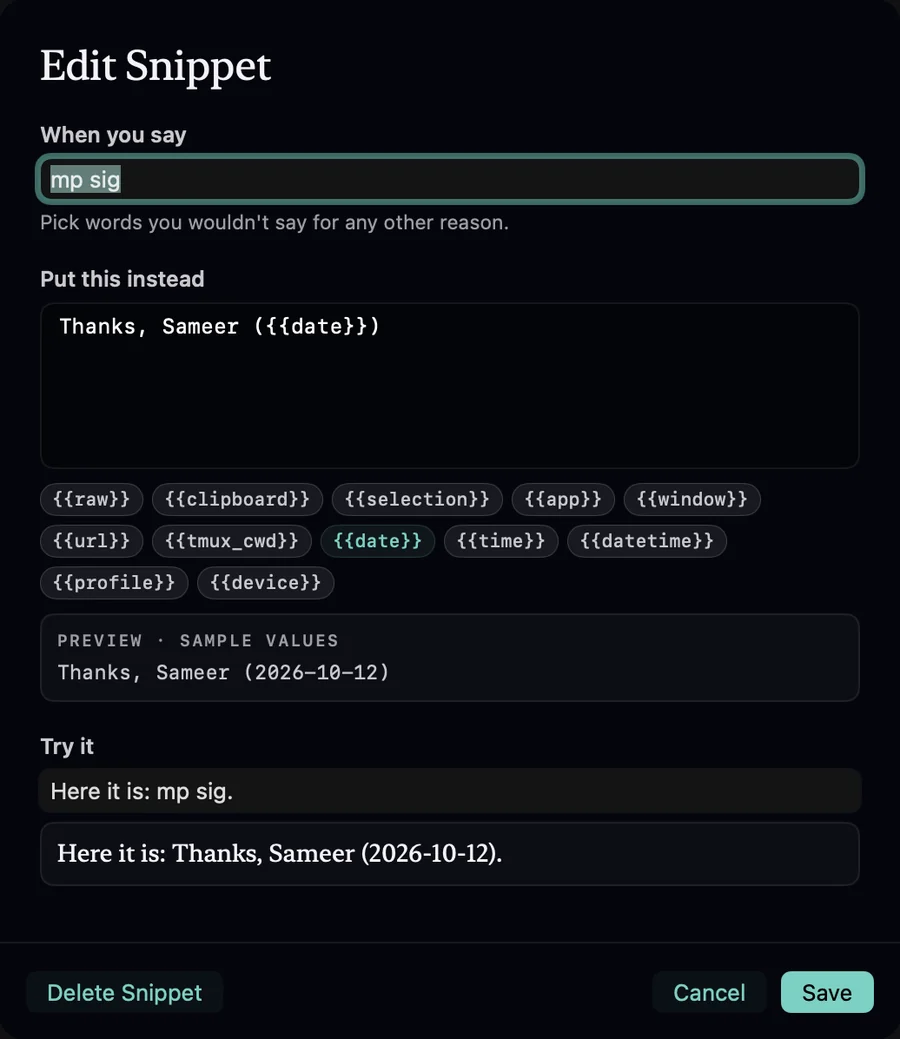
In the Mac app's window, open Snippets in the sidebar and choose New Snippet:
- When you say: the trigger. Pick words you wouldn't say for any other reason.
- Put this instead: the expansion. It can use the template variables, with the same chips and preview.
- Try it: type a sentence and see it expand, live.
How matching works#
- Triggers match whole words anywhere in the dictation, ignoring case and the commas the recognizer adds.
- When two triggers overlap, the longer one wins.
- Duplicate triggers are refused.
- Snippets apply to every profile, before its format and template.
Examples#
| When you say | Put this instead |
|---|---|
| my email | sameer@example.com |
| sig | Thanks, |
| test plan please | Before changing code, restate the task in one sentence and list the files you’ll touch. Then write the failing test first. |
| this page | {{url}} |