Obsidian, Apple Notes and Reminders
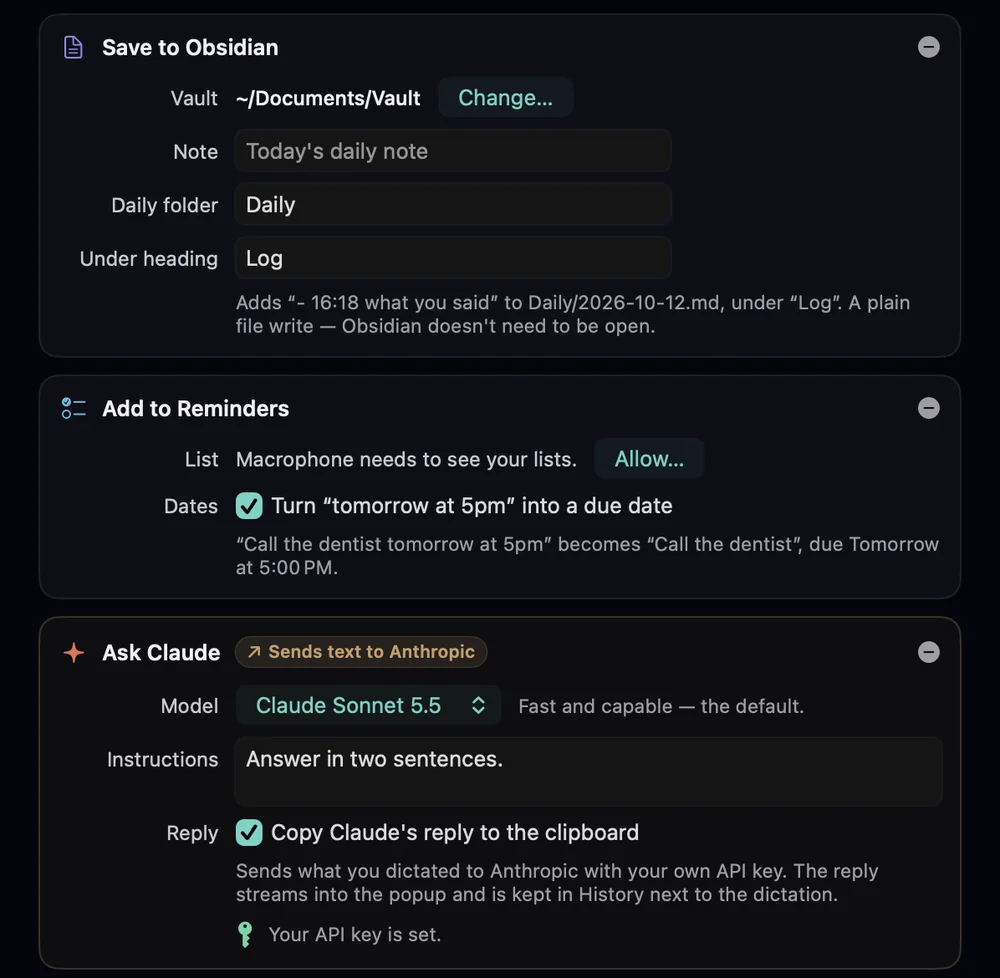
Three actions under a profile’s Also. They run alongside wherever the text goes, or on their own if Where it goes is set to Nowhere — only do what’s under “Also”.
Save to Obsidian#
| Vault | Choose Vault… picks the vault’s folder. |
|---|---|
| Note | A path inside the vault. Empty means today’s daily note. |
| Daily folder | Where daily notes live. Empty uses the folder from Obsidian’s Daily notes settings, else the vault root. The note’s name follows that plugin’s date format (default YYYY-MM-DD). |
| Under heading | Optional. The line is added at the end of that section; the heading is created at the end of the note if it’s missing. |
Each dictation adds a line like this, with any extra lines indented under the bullet:
- 14:05 Call the venue about the projector before Thursday.It's a plain file write, so Obsidian doesn't need to be open. Paths can't escape the vault. Step by step: log to your Obsidian daily note.
Save to Apple Notes#
Each dictation either Makes a new note (in Folder, else Notes' default folder; a folder that doesn't exist is created) or Adds to one note (Note title; the note is created if there's none). It uses Automation for Notes, asked from the editor's Allow… button or the first time it runs.
Add to Reminders#
- List: your default list, or one of yours. Macrophone asks for Reminders access (Allow…) to show your lists.
- Dates: Turn “tomorrow at 5pm” into a due date (on by default). “Call the dentist tomorrow at 5pm” becomes a reminder called “Call the dentist”, due tomorrow at 5:00 PM, with an alert.
The panel confirms it: “In Reminders · due tomorrow at 5:00 PM”.
Sync and privacy#
These save on your Mac. Notes and Reminders sync through iCloud if you use iCloud for them, and an Obsidian vault syncs however you sync it (iCloud Drive, Obsidian Sync). Macrophone itself sends nothing anywhere for these actions.